Setting up Terms of Service, Return and Refund Policy, Privacy Policy and Contact
When you sell with Tentary, you sell in your own name. Here is how to add your terms of service, cancellation policy, privacy policy and legal notice, and which templates we provide.
On this page
Where to find your legal pages
Open your Settings and click Legal texts & withdrawal in the Shop area. The page is only available once you have saved your billing address.
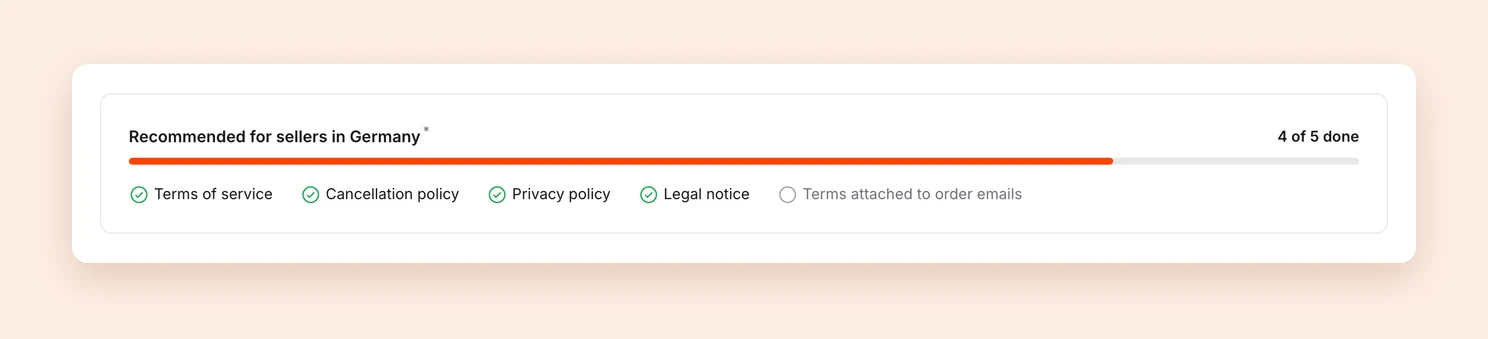
At the top of the page you see which documents we recommend for sellers in your country, and how many of them you have already filled in, for example 4 of 5 done.
Please note: Laws change from time to time. Keep your legal pages up to date.
Which documents there are
Which documents you can add depends on your shop’s country:
- Terms of service and Privacy policy exist for every shop.
- Cancellation policy: If you sell from the EU, you add a cancellation policy. Outside the EU, this document is called Return and refund policy.
- Legal notice: In Germany, Austria and Switzerland, you add a legal notice. In all other countries, this document is called Contact information.
Every document you fill in is linked at the bottom of all your product, checkout and shop pages. If you do not provide a separate cancellation policy, Tentary refers customers to your terms of service for withdrawal.
Your contact details, meaning your business name, address and email address, are always shown on your contact page or legal notice as well. They come from your billing address and are therefore visible to every visitor of your shop. If you want to keep your private address private, you can use a service that provides a business address.
Using templates
We provide templates for all documents. In the relevant section, click Use German template or Use English template. Tentary then fills the text with your details from the billing address, for example your name, address and tax number. Check the text afterwards and click Save changes.
- Germany, Austria and Switzerland: Our terms template is based on the German e-commerce association bevh, our privacy template on the law firm Weiß & Partner.
- All other countries: Here we provide general templates that have not been reviewed for the law of your country. Adapt them to your business before publishing, and replace every note in square brackets, for example about your service providers, cookies and retention periods.
Note: We do not provide legal advice or accept liability for these templates. If you want to be on the safe side, you can use legally reviewed texts with attorney liability from our partner IT-Recht Kanzlei, tailored to digital products and online courses.
Attaching your terms to purchase confirmations
Below your terms you find the option Attach copy of terms of service and cancellation policy to order confirmation e-mails (as PDF). When it is on, your customers receive both documents as a PDF with every purchase confirmation. We recommend this option for shops from Germany, Austria and Switzerland.
Withdrawal button and right of withdrawal for companies
Further down the page you find two settings about withdrawal:
- Withdrawal button: Here you decide whether the Withdraw from contract button appears in your shop’s footer. See Withdrawal button.
- Right of withdrawal for companies: In many countries, companies have no statutory right of withdrawal. With the default setting No right of withdrawal for companies, customers who buy as a company confirm in the checkout that they buy as an entrepreneur and have no right of withdrawal. If you want to give companies the same right of withdrawal as private customers, choose Companies have the same right of withdrawal as private customers.
Updating the templates
Tentary does not update your legal pages automatically. You can edit a template freely after inserting it, and an automatic update would overwrite your edits.
This means:
- When laws change, we update our templates. To get the new version into your shop, apply the template again.
- When your details change, for example your name, address, tax number or email address for customer inquiries, apply the template again as well, or change the details by hand.
To do so, click Use German template or Use English template and then Save changes.
Important: A template replaces the entire text in the field. If you have edited the text, save your changes somewhere else first, for example in a separate document.
Last updated October 13, 2026