Review and pay affiliate commissions
Every sale through an affiliate link creates a commission. Here you learn how to review commissions, create a credit note and pay your affiliates.
On this page
Review commissions
Under Affiliate program › Sales you see every sale that earned a commission, with product, price, commission, date and affiliate. Filter by affiliate shows the sales of one person only. view order opens the related order.
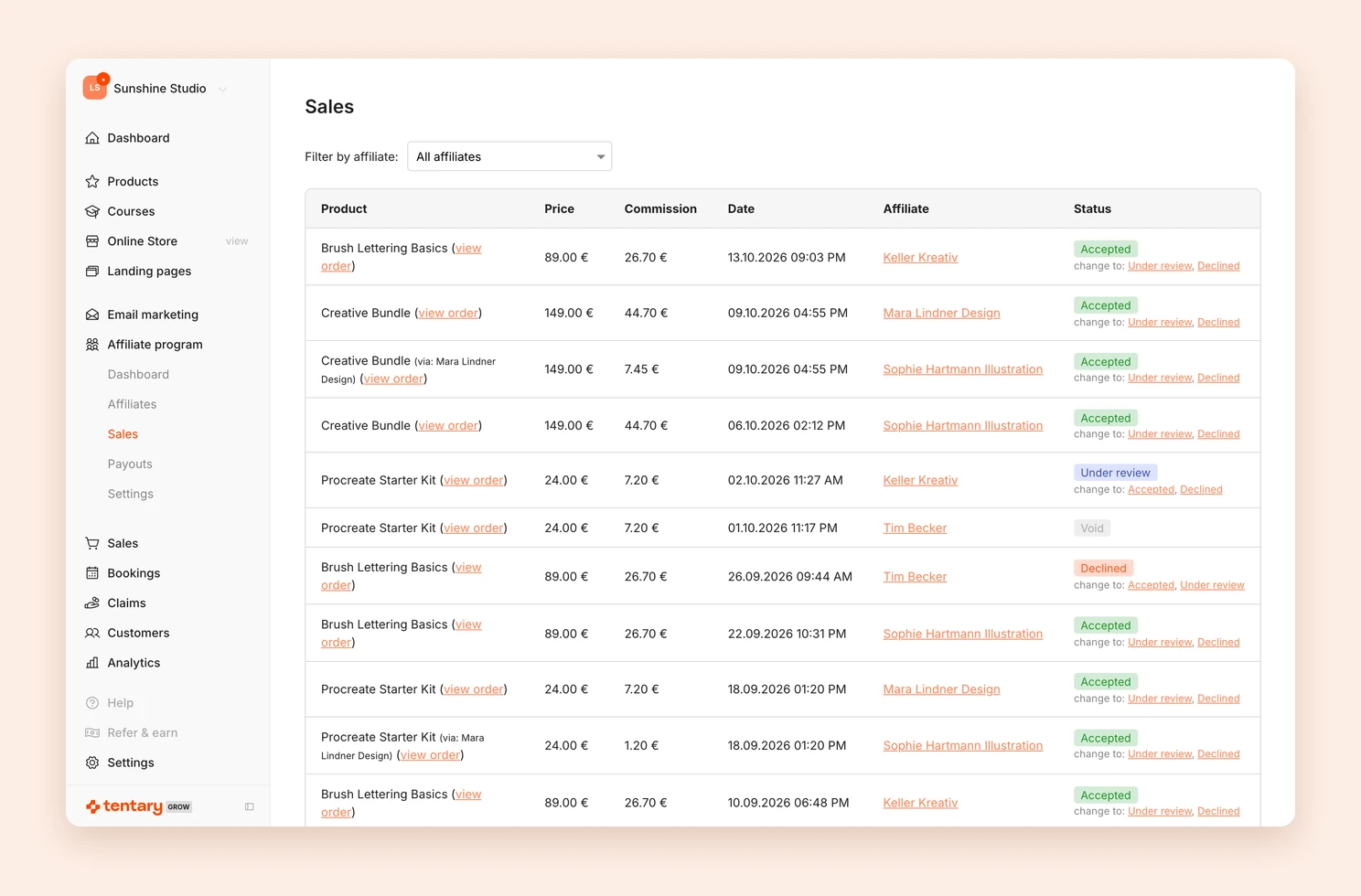
Each commission has a status:
- Accepted: The default. The commission is valid and can be paid out.
- Under review: You want to check the order first. The commission is not paid out for now.
- Declined: The commission is not paid out.
- Paid: The commission is on a credit note. It gets this status as soon as you create the credit note, even if the money has not been transferred yet.
- Void: The order was refunded.
Under change to: you set a commission to Accepted, Under review or Declined. If an order is refunded, its commission becomes void automatically.
Pay out commissions
- Open Affiliate program › Payouts. For each affiliate you see the Unpaid and Paid amounts.
- Click Pay now next to the affiliate. At the bottom of the page, the Affiliate section shows the person’s address and Payout details, meaning IBAN, SWIFT or PayPal address.
- Under Unpaid commissions, tick every commission you want to pay out.
- Click Create invoice.
Tentary then creates a credit note in your name and emails it to the affiliate. The selected commissions are now settled and have the status Paid. You find the credit note under Invoices.
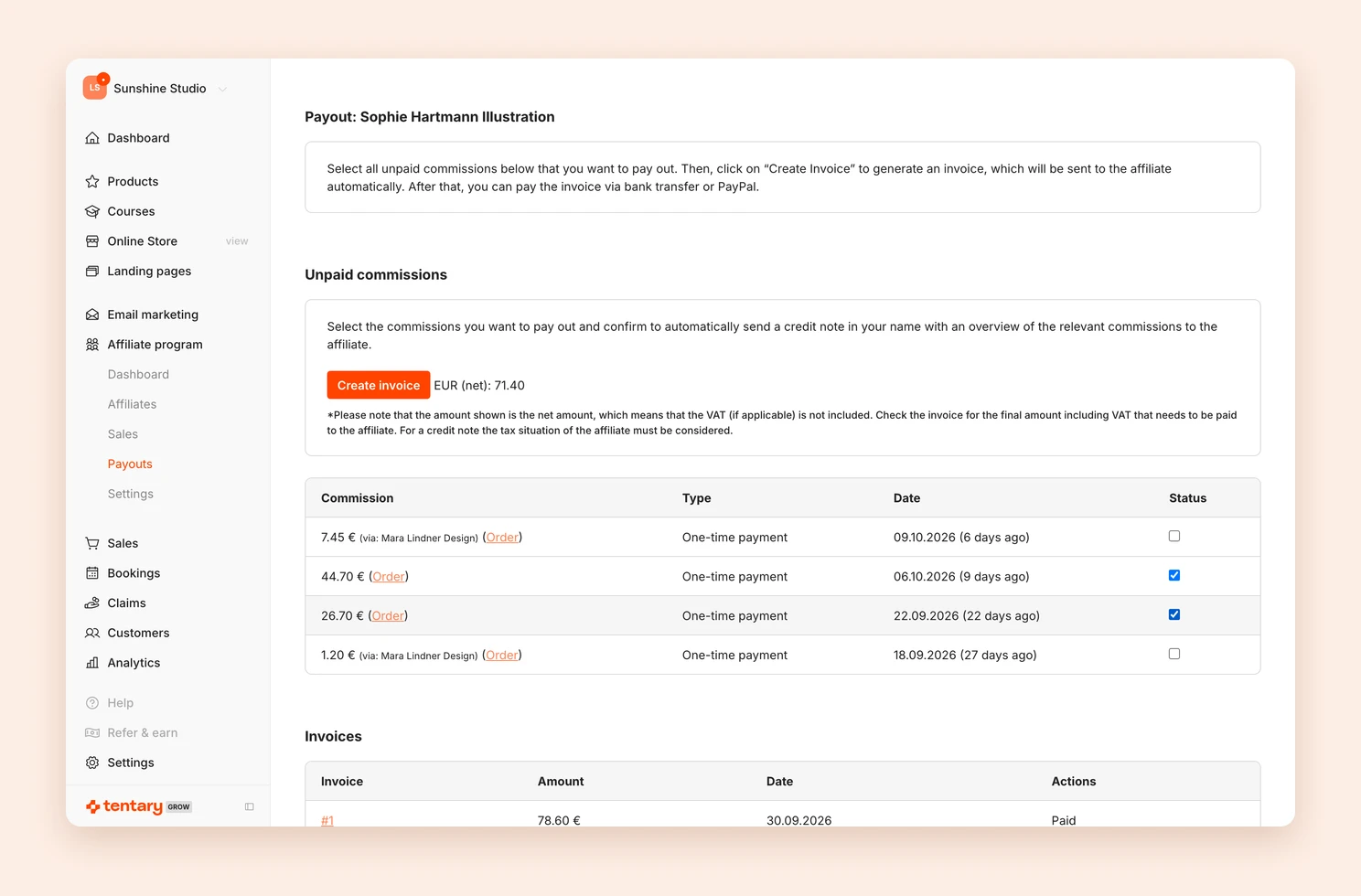
The amount next to Create invoice is net. Invoices then shows the final amount of the credit note, meaning gross including any VAT. It depends on the affiliate’s tax situation. This is the amount you transfer.
- Bank transfer: Transfer the amount from your bank account to the IBAN shown.
- PayPal: If the affiliate added a PayPal address, click Pay next to the invoice. PayPal opens with amount, recipient and reference filled in. The button does not change anything in Tentary.
Once you have transferred the money, click Mark paid next to the invoice. The Actions column then shows Paid. This way you always see which credit notes you have already paid.
Important: You are responsible for paying your affiliates. Even if you connected Stripe, PayPal or Mollie to Tentary, Tentary has no access to your revenue.
When to pay out
You decide when to pay out. We recommend waiting at least 30 days after the sale. That way you do not pay commissions for orders that are later refunded or charged back.
Write your payout conditions, for example once a month, under Affiliate program › Settings in the Information for your affiliates field. Affiliates see this text before they join your program.
FAQ
How is the commission calculated for subscriptions and installment payments?
For subscriptions, affiliates earn a commission on every recurring payment. For installment payments it depends on your setting: either once on the total price at the first installment, or a share of every installment that is paid. See Set up your affiliate program.
Are there commissions for referrals between affiliates?
Yes, if you enabled referral commission. It appears under Sales marked Referral and is added up with the person’s other commissions under Payouts. See Enable referral commission.
Last updated October 15, 2026