Set up and manage your affiliate program
With Tentary you set up your own affiliate program for your products. Affiliates promote your products and earn a commission you set for every sale.
On this page
- Where to find your affiliate program
- Set up your affiliate program
- Invite affiliates
- Approve and manage affiliates
- Make landing pages available to affiliates
- Review and pay out commissions
- FAQ
- How do I switch to the affiliate view?
- Do my affiliates need a Tentary account?
- How long does an affiliate link last?
- Does Tentary handle my payouts?
Where to find your affiliate program
Open Affiliate program in the menu. It has these pages:
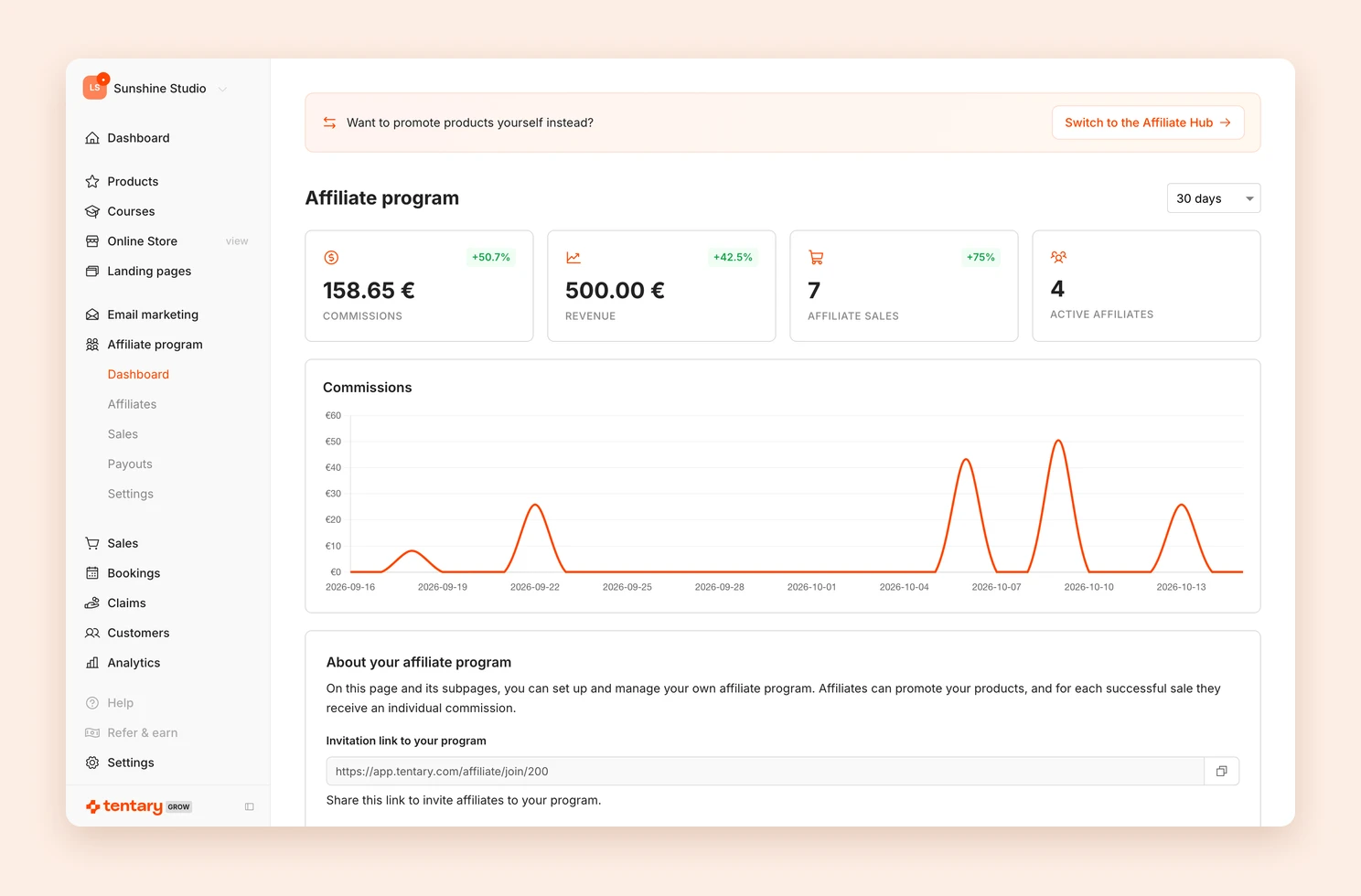
- Dashboard: commissions, revenue, affiliate sales and active affiliates for a period of your choice, plus your invitation link, recent sales and your top affiliates.
- Affiliates: everyone who joined your program.
- Sales: every sale that earned a commission.
- Payouts: unpaid and paid commissions per affiliate.
- Settings: everything about your program.
Set up your affiliate program
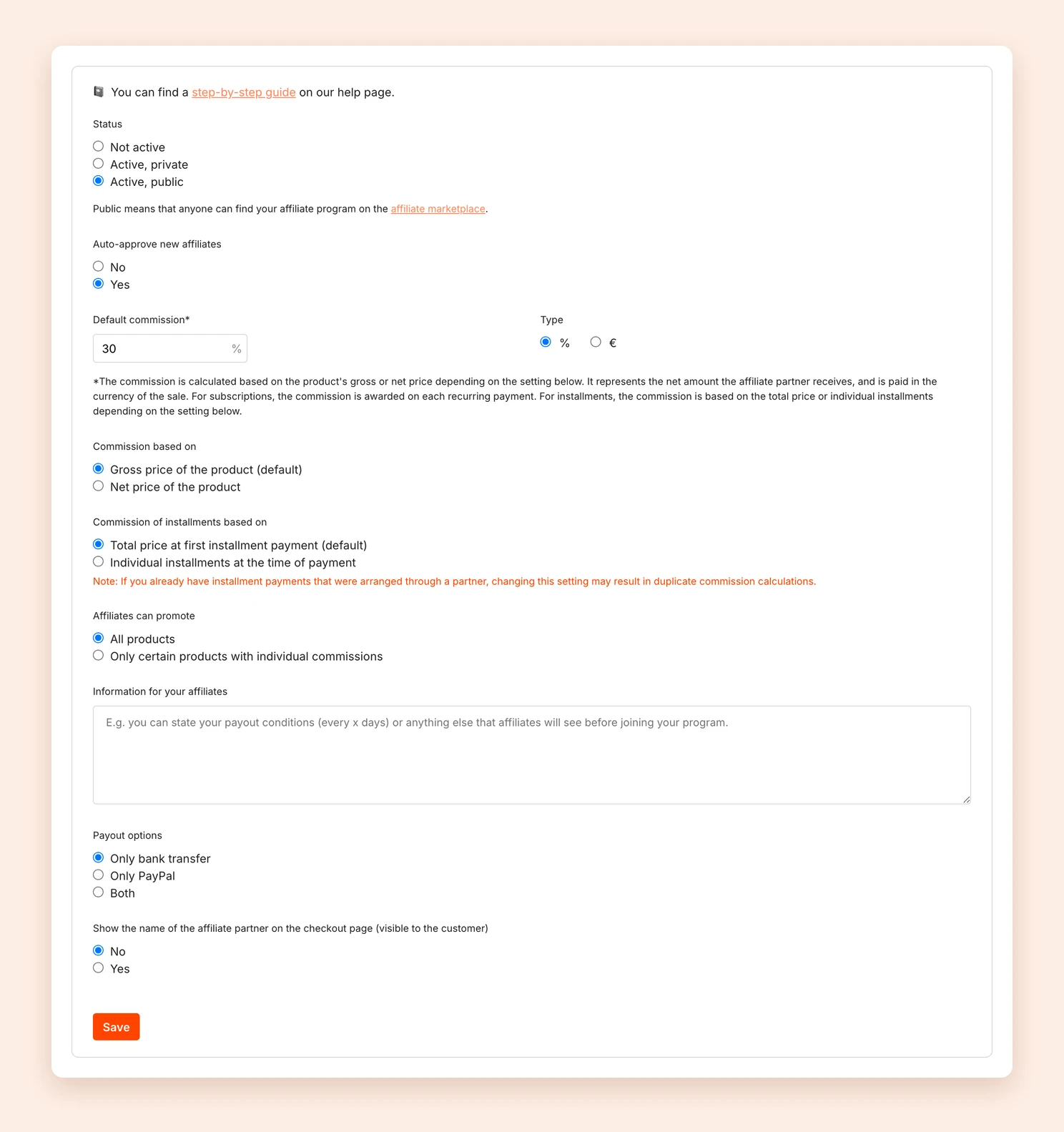
Open Affiliate program › Settings and decide:
- Status: Not active, Active, private or Active, public. A private program can only be reached through your invitation link. A public program also appears on the affiliate marketplace, where every affiliate on Tentary can find it.
- Auto-approve new affiliates: With Yes, everyone can start right away. With No, you approve each person yourself.
- Default commission and Type: the commission as a percentage or as a fixed amount in your currency.
- Commission based on: Percentage commissions are calculated from the Gross price of the product (default). Alternatively, choose the Net price of the product.
- Commission of installments based on: By default, the commission is paid on the Total price at first installment payment. Alternatively, affiliates earn a share of the Individual installments at the time of payment.
- Affiliates can promote: All products or Only certain products with individual commissions. With the second option, you choose the products and can set a separate commission for each.
- Information for your affiliates: text that affiliates see before joining, for example your payout conditions.
- Payout options: whether you pay out by Only bank transfer, Only PayPal or Both. Affiliates must add matching details before they can join.
- Show the name of the affiliate partner on the checkout page: the transparency mode.
- Referral commission (optional): a small extra commission for affiliates who recruit other affiliates. See Enable referral commission.
Finally, click Save.
Note: The commission is the net amount affiliates receive, in the currency of the sale. For subscriptions, affiliates earn a commission on every recurring payment.
Invite affiliates
Under Affiliate program › Dashboard you find the Invitation link to your program. Click Copy and share the link, for example by email or in your community.
Anyone who opens the link needs a free Tentary account. After joining, they promote your products with their own links. To see what this looks like for your affiliates, read Affiliate marketing for partners.
Approve and manage affiliates
Under Affiliate program › Affiliates you see everyone with their Status. For new affiliates who are waiting, click approve or decline.
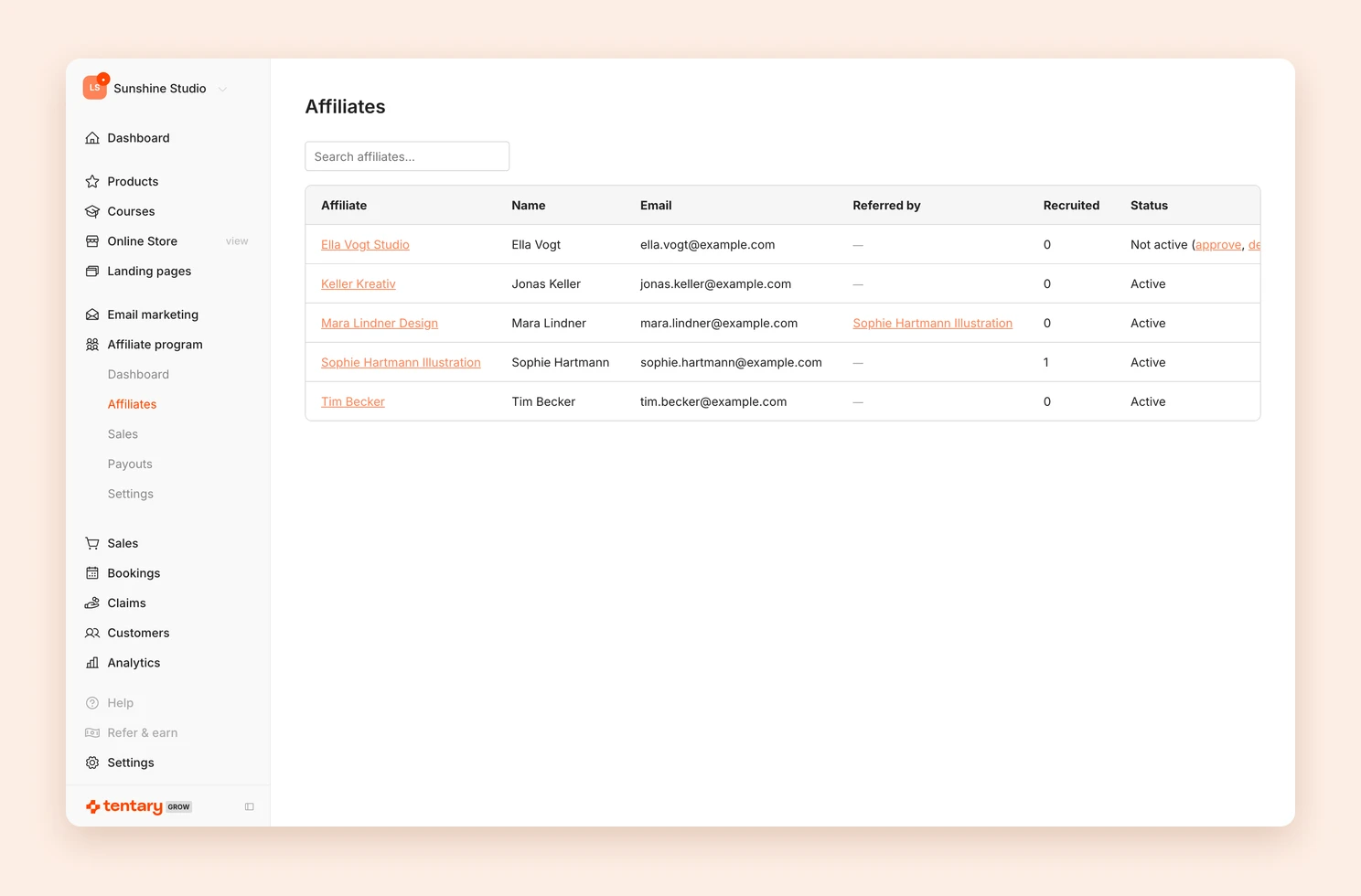
Click a name to open the details page. There you see the person’s billing and tax details and can remove them from your program with disable. View commissions and payouts takes you straight to their commissions.
Make landing pages available to affiliates
Besides your products, affiliates can also promote your landing pages. Open the landing page in the builder and, in the Settings tab, turn on Available for affiliates in the Affiliates section. The landing page then appears for your affiliates next to your products, with their personal affiliate ID in the link.
This is useful, for example, when a landing page presents several products or leads up to a purchase. When someone opens the landing page through an affiliate’s link, the browser remembers the affiliate ID. If the person then clicks one of your products and buys it, the affiliate earns the commission. This also applies if they buy later, as long as it is within 30 days.
Review and pay out commissions
Every sale through an affiliate link creates a commission within a few minutes, and the affiliate receives an email about it. Under Sales you review commissions, under Payouts you pay them out. See Pay affiliate commissions.
If a sale came in without an affiliate link although someone referred it, you can assign it in the order afterwards. See Manage sales.
FAQ
How do I switch to the affiliate view?
The merchant view and the affiliate view are separate. On your affiliate program dashboard, click Switch to the Affiliate Hub at the top. There you can join other programs and promote products yourself. To go back, click Switch to Merchant view in the sidebar.
Do my affiliates need a Tentary account?
Yes. The account is free and comes with no obligations. Affiliates need it to add their billing and payout details and to see their links and commissions.
How long does an affiliate link last?
After a click on an affiliate link, the browser remembers the affiliate ID for 30 days. If the person buys within that time, the affiliate earns the commission. If they click another affiliate’s link in between, the last click counts. See Affiliate links.
Does Tentary handle my payouts?
No. Tentary tracks the commissions and creates the credit notes. You transfer the money yourself, because Tentary has no access to your revenue.
Last updated October 15, 2026