Enable referral commission for your affiliate program
With referral commission, you pay an affiliate a small extra commission when someone they recruited sells in your program. This motivates your affiliates to bring in new partners.
On this page
- How referral commission works
- Enable referral commission
- Set the referrer manually
- Where to see referral commissions
- Frequently asked questions
- Who pays the referral commission?
- Does it reduce the direct affiliate’s commission?
- Which affiliates qualify for referral commission?
- Does the referral commission also apply to other programs?
- What happens with refunds?
- Can an affiliate set themselves as their own referrer?
How referral commission works
Example: Affiliate A recruits Affiliate B for your program. Once B sells one of your products for €100, B receives their regular commission as usual (for example €70). On top of that, A receives a small referral commission from you (for example €3).
Note: Referral commission is paid from your margin and does not reduce the direct affiliate’s commission. It’s an additional incentive so your affiliates actively bring new partners into your program.
Enable referral commission
- Open Affiliate program › Settings.
- Go to the Referral commission (optional) section at the bottom of the page.
- Set Enable referral commission to Yes.
- Enter the value under Referral commission and choose a percentage or a fixed amount in your currency under Type.
- Click Save.
Tip: Keep the referral commission small (for example 1 to 5 percent). It’s an additional incentive, not a main income stream.
Set the referrer manually
If an affiliate brought someone into your program before referral commission was active, you can record the relationship after the fact:
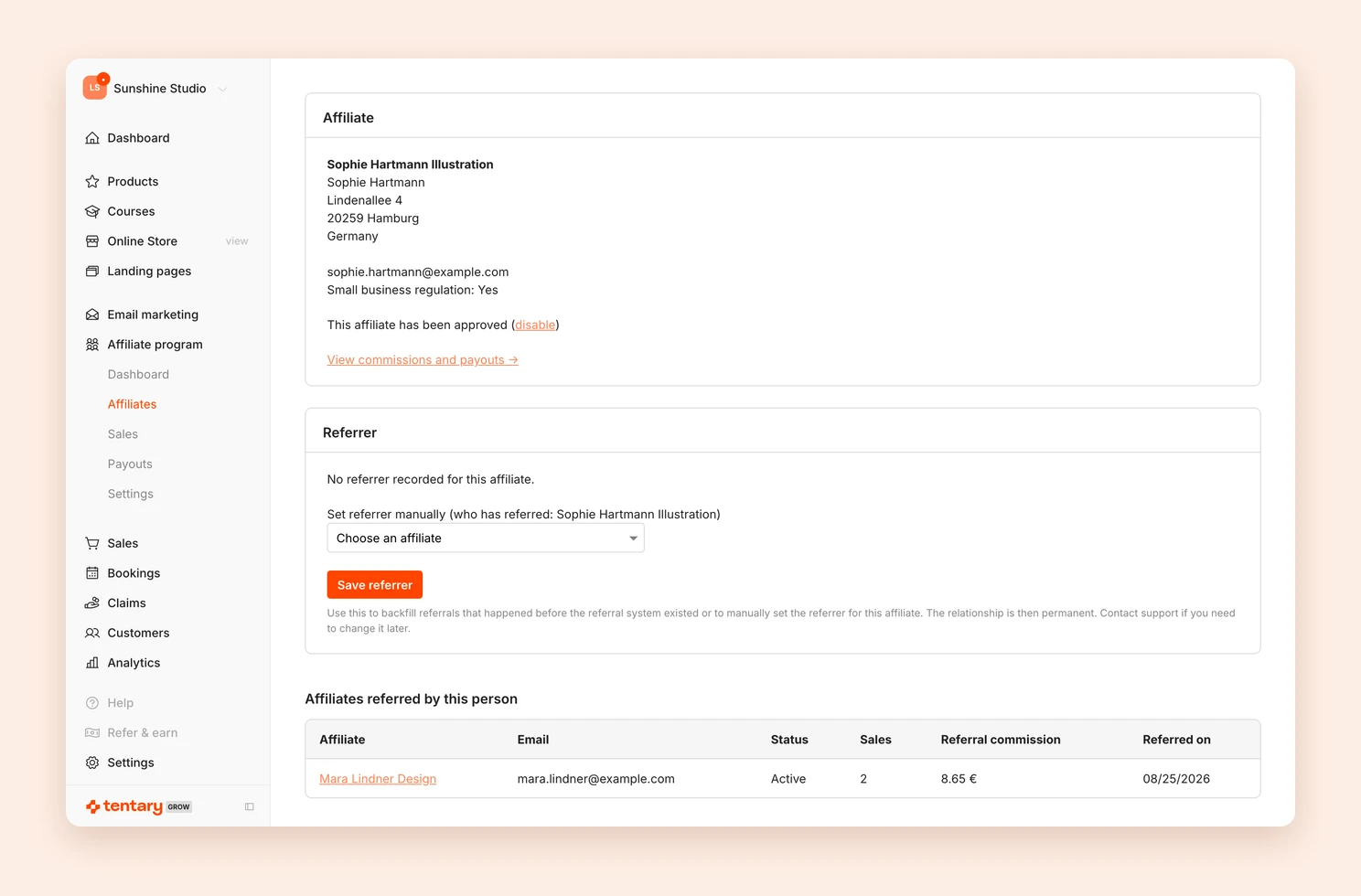
- Open Affiliate program › Affiliates and click the recruited affiliate.
- In the Referrer section, choose the person who recruited them under Choose an affiliate.
- Click Save referrer.
Important: The relationship is permanent once saved. If you need to change it later, please contact our support.
Where to see referral commissions
- Affiliate program › Sales: Referral commissions are marked Referral, together with the person who actually made the sale.
- Affiliate program › Payouts: The unpaid commissions of an affiliate are added up, meaning the direct commission and the referral commission. See Pay affiliate commissions.
- Affiliate detail page: the Affiliates referred by this person section lists everyone this affiliate has brought into your program, including their sales and referral commissions so far.
Frequently asked questions
Who pays the referral commission?
You, as the seller. It comes on top of your regular affiliate commission and is paid from your margin.
Does it reduce the direct affiliate’s commission?
No. The direct affiliate still receives their full commission. Referral commission is an additional payout to the referrer.
Which affiliates qualify for referral commission?
Only active affiliates in your program. Affiliates who are declined or not yet approved do not earn referral commission, even if they are recorded as a referrer.
Does the referral commission also apply to other programs?
No. The link between referrer and recruited affiliate is specific to your program. If the recruited person later joins another program, the original referrer earns nothing there.
What happens with refunds?
Like the regular commission, the referral commission becomes void once the order is refunded.
Can an affiliate set themselves as their own referrer?
No. Automatic checks prevent self-referrals and loops (for example A refers B, B refers A).
Last updated October 15, 2026