Limit Product Access and Duration of Access
Do you want to limit product access or the duration of access to one of your products? In this article, we explain where to find this option and what settings you can configure.
On this page
Activate option
The option Limit product access and duration of access is available for all product types except the direct link.
When creating a new product, scroll to the bottom of the product settings. If you have already created a product and now want to limit its access or duration, open your product overview, click the Edit button for the respective product, and scroll down to the settings.
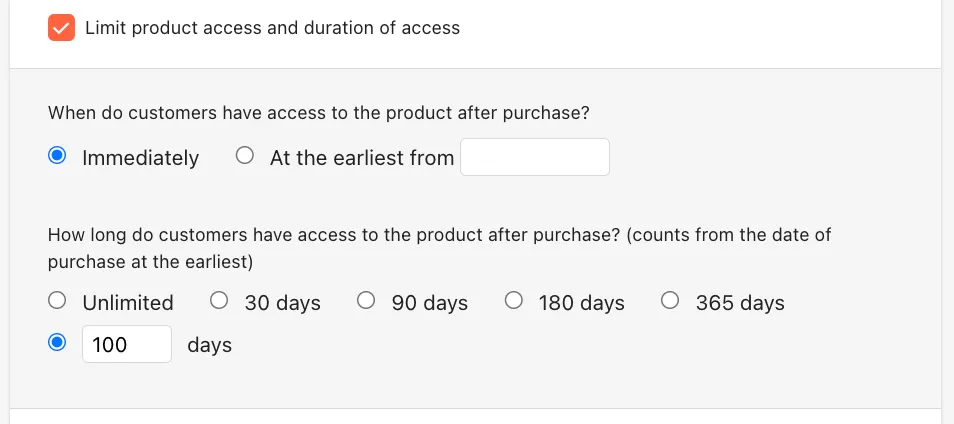
You can enable the function by checking the box. To configure the limitation, there are two separate settings: product access and duration of access.
Product access
Product access defines the point in time when customers can access the purchased product.
By default, the setting is Immediate. This means that as soon as customers have paid for your product, they gain immediate access.
Note: If you allow SEPA payments and use the additional option Deliver immediately after purchase, the product will also be delivered instantly, even if the payment has not yet been completed. More information on this can be found in Everything About SEPA Direct Debit.
You can restrict product access if you want customers to gain access at a later date. In this case, you can select the option At the earliest from and set a future date.
Duration of access
The duration of access determines how long customers can access the purchased product.
The default setting is Unlimited. You can choose between 30 days, 90 days, 180 days, and 365 days or enter a custom number of days.
Don’t forget to click the Save button afterward to apply your changes to the product.
Last updated February 24, 2025